Why not just use Copilot?
Microsoft Copilot and ChatGPT Enterprise are excellent general assistants. JTAI is a different tool: purpose-built for legal services organizations, grounded in your own documents, and safe to put in front of the people you serve. Here is exactly where that matters.
The short answer
A general copilot answers from the web. JTAI answers from your organization.
Copilot and ChatGPT Enterprise are built to help an individual employee move faster inside their own tools. JTAI is built for the organization: curated, permissioned hubs of your documents, a citation on every claim, native LegalServer access, and agents that can face the public safely. It is not a replacement for Microsoft 365. It is the layer that makes AI trustworthy for legal work.
Side by side
The same question asked of each tool. The difference is what they are allowed to know, and who they are safe to talk to.
JTAI
Purpose-built for legal
Microsoft Copilot
Microsoft 365
ChatGPT Enterprise
OpenAI
Citation-grounded answers from your documents
Every claim traces back to a source you can open.
Native LegalServer integration
Matters, case notes, and documents as chat tools.
Public-facing intake agents
Safe to put in front of the people you serve.
QA monitoring for UPL risk
Answers reviewed for unauthorized-practice-of-law signals.
Collaborative hubs across organizations
Share a curated knowledge hub between partner orgs.
Curated, permissioned document hubs
Scope exactly what the AI can see, per role.
No training on your data
Your content is never used to train models.
Built for legal services workflows
Intake, matters, funding, and program staff in mind.
Citation-grounded answers from your documents
Every claim traces back to a source you can open.
Native LegalServer integration
Matters, case notes, and documents as chat tools.
Public-facing intake agents
Safe to put in front of the people you serve.
QA monitoring for UPL risk
Answers reviewed for unauthorized-practice-of-law signals.
Collaborative hubs across organizations
Share a curated knowledge hub between partner orgs.
Curated, permissioned document hubs
Scope exactly what the AI can see, per role.
No training on your data
Your content is never used to train models.
Built for legal services workflows
Intake, matters, funding, and program staff in mind.
Comparison reflects standard product capabilities as of publication. Microsoft and OpenAI offerings evolve; verify current features for your plan.
Where JTAI is different
Six things a general assistant was never designed to do.
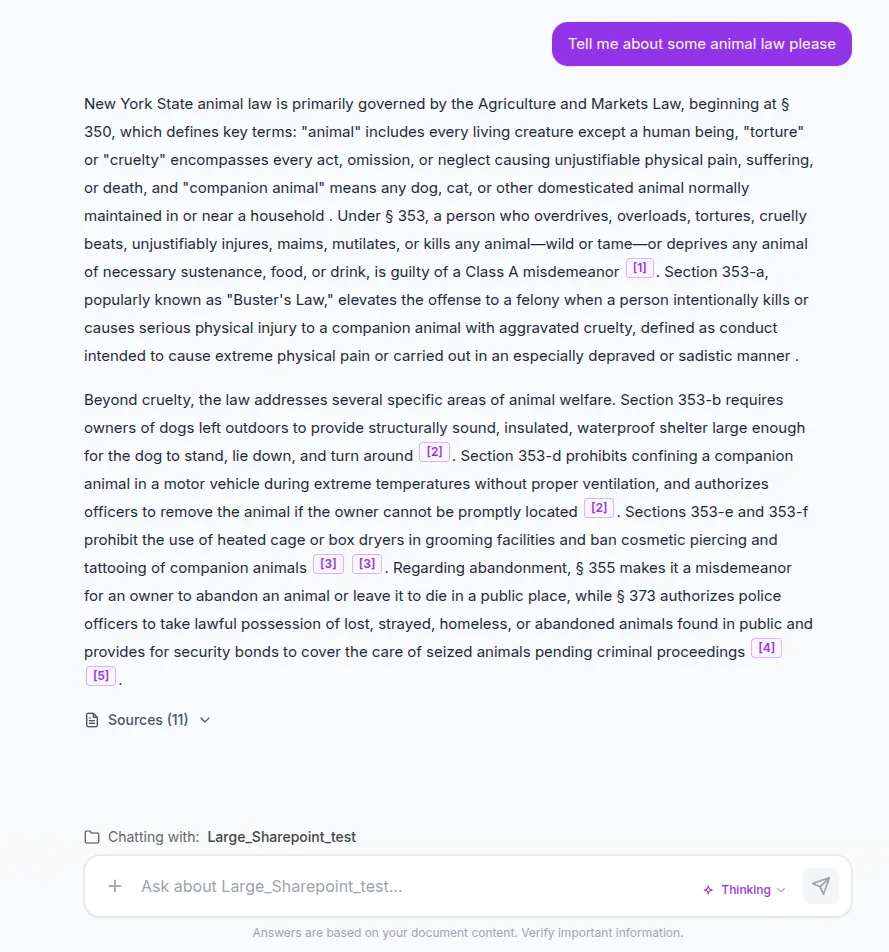
Grounded, cited answers
Every answer traces back to your documents
General copilots answer from the open web and whatever Microsoft 365 files they can reach. JTAI answers from curated hubs of your organization's own documents, and puts a citation on every claim so staff can verify the source in one click.
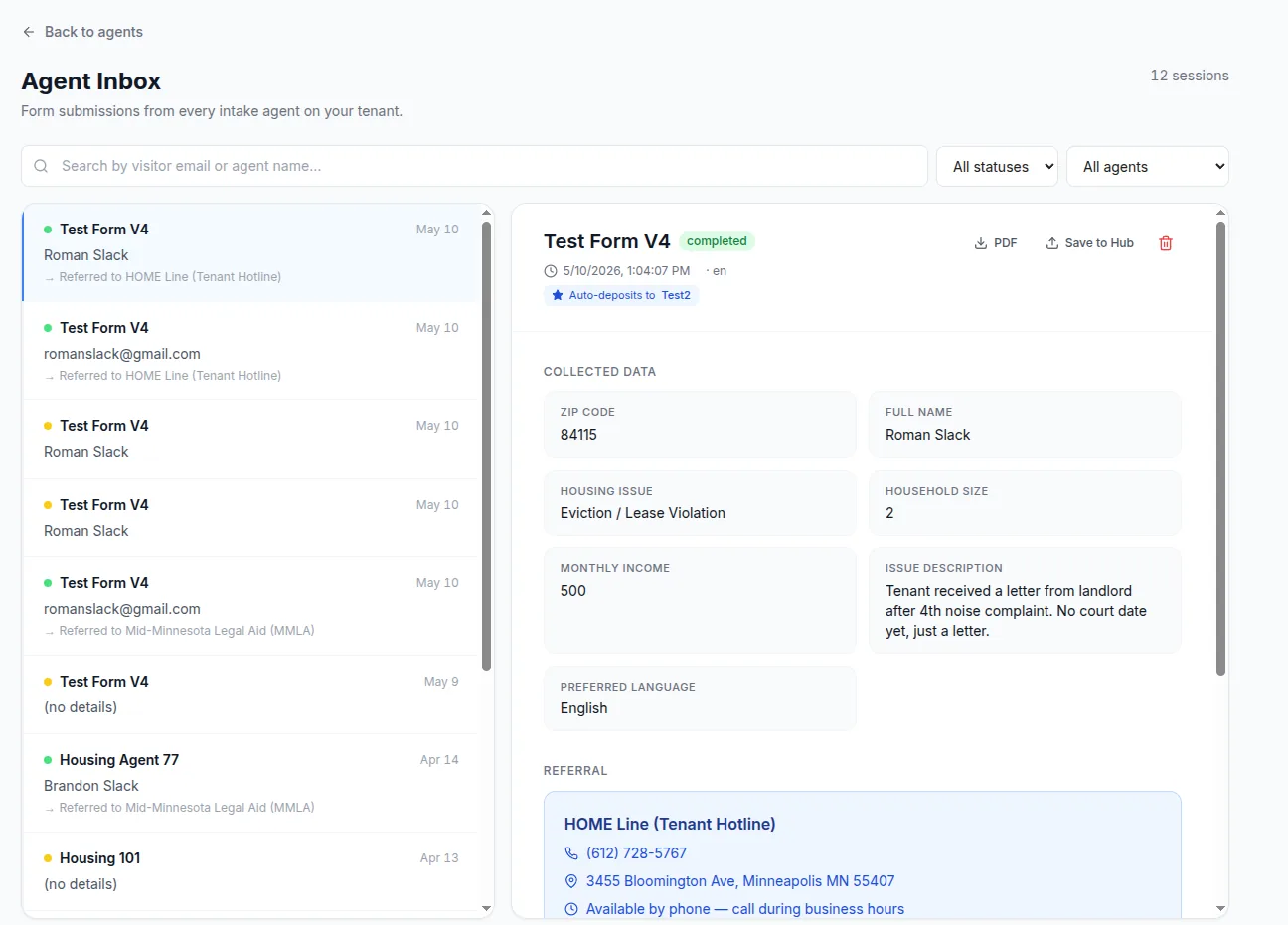
Public-facing intake
Agents that safely face the people you serve
JTAI intake agents guide an applicant through a form, collect exactly the fields you define, and push a clean prescreen and referral into LegalServer. Copilot and ChatGPT Enterprise are built for internal staff, not the public.
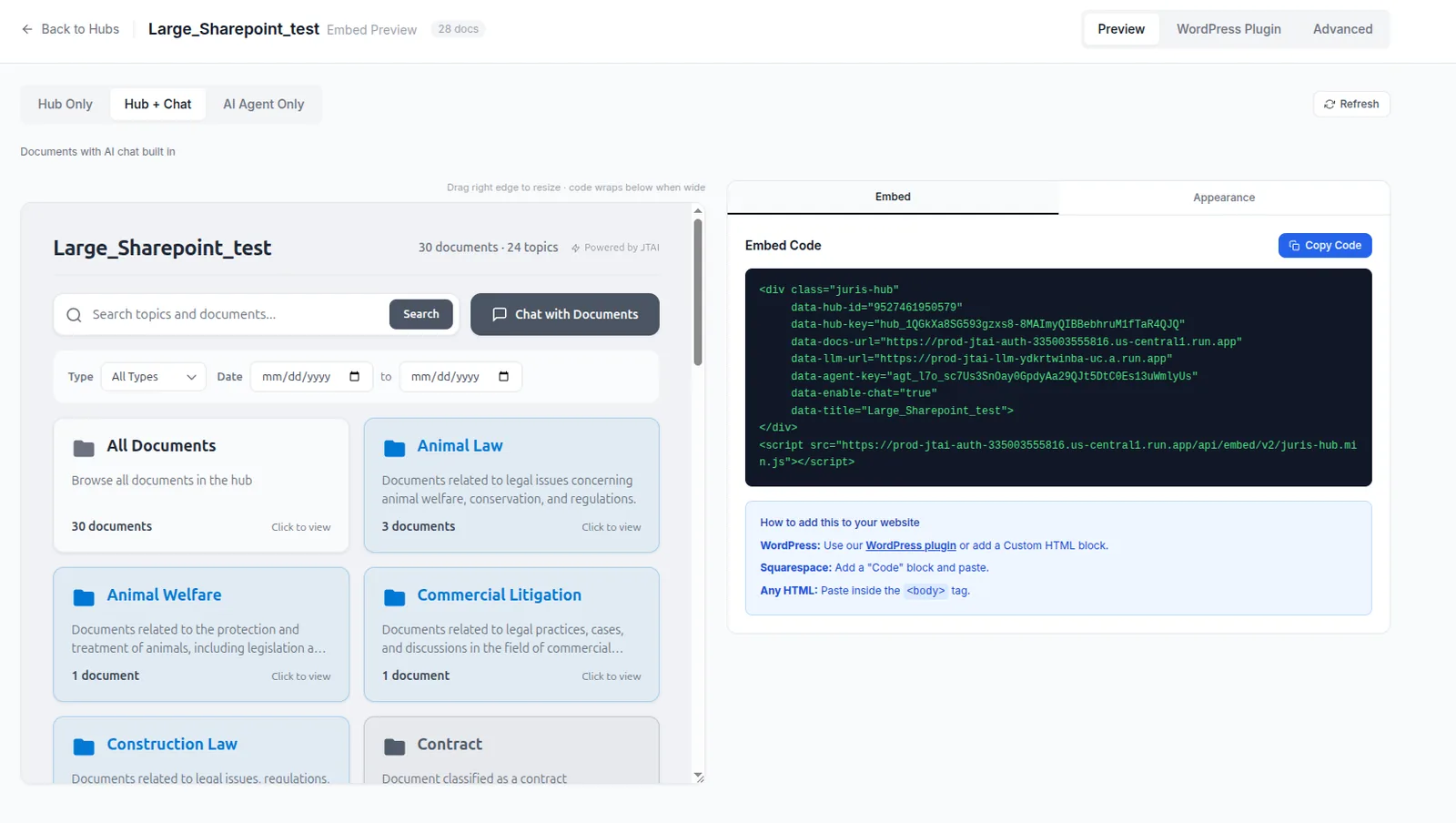
Embed anywhere
Drop JTAI straight onto your own website
Copy one snippet and your hub or agent lives on your site, intranet, or WordPress, giving your visitors grounded, cited answers in your own pages. A general copilot lives inside its vendor's app, not on yours.
Native LegalServer integration
JTAI reads matters, case notes, services, and documents directly from LegalServer as scoped chat tools, gated per role and per user. A general copilot has no idea your case management system exists.
QA monitoring for UPL risk
Because JTAI can be client-facing, it monitors answers for unauthorized-practice-of-law signals and other risks, giving you a record and a safety net a general assistant simply does not provide.
Collaborative hubs across organizations
Legal services work spans partner organizations. JTAI lets you build a curated knowledge hub and share it across orgs, with permissions intact, rather than trapping everything inside a single Microsoft tenant.
Keep Copilot. Add JTAI.
This is not an either-or. JTAI connects to SharePoint, OneDrive, and Google Drive and sits alongside the tools your team already pays for. Let a general copilot draft an email. Use JTAI for anything that has to be grounded in your documents, cited, or shown to a client.
- Syncs from SharePoint, OneDrive, and Google Drive
- Runs next to Microsoft 365, not instead of it
- Adds LegalServer, intake, and QA on top
- One place for grounded, cited, client-safe answers
Common questions
Do we have to replace Microsoft 365 or Copilot?
No. JTAI is designed to run alongside Microsoft 365. It connects to SharePoint, OneDrive, and Google Drive, and your team can keep using Copilot for everyday drafting while JTAI handles anything that has to be grounded, cited, or client-facing.
Can Copilot read our LegalServer matters?
No. Microsoft Copilot works within the Microsoft graph. JTAI integrates directly with LegalServer, so matters, case notes, and documents become answerable, with per-role and per-user access controls.
Is JTAI safe to put in front of clients?
Yes. Public-facing JTAI agents are hard-scoped to the hubs you allow, and answers are monitored for unauthorized-practice-of-law and other risk signals. That combination is why organizations use JTAI for intake, not a general chatbot.
See it on your own documents
In a guided pilot, we build your first hub from your public materials and show you the difference on the work you actually do.